Over the last couple of months, I’ve built several CLI tools, some focused on developer workflows. That got me thinking: Are we designing our developer tools with AI agents in mind?
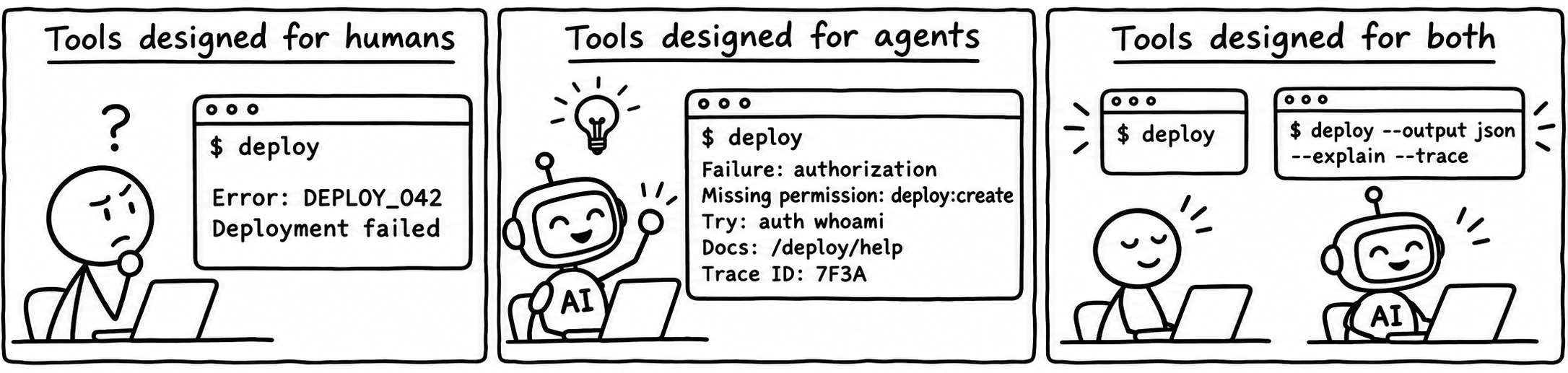
Design for both: readable output for humans and structured recovery guidance for agents.
Imagine an AI agent deploying a service through an internal CLI:
$ acme deploy --env staging

Error: DEPLOY_042
Deployment failed.
Suppose the deployment was rejected because the active account lacks deploy:create permission in staging. The CLI has that explanation, but none of it reaches the agent.
For a developer who has seen this error before, DEPLOY_042 might be enough. An agent unfamiliar with the tool has to look it up or inspect logs to identify the cause. It might also retry the deployment, even though retrying won’t fix the missing permission.
The agent spends tool calls, tokens, and time recovering information the CLI could have returned with the failure.
Familiar tools vs. custom tools
An agent may recognize common errors from well-known tools through its training. Custom or internal tools may be unfamiliar, so their output needs to provide more context.
Even with familiar tools, that knowledge can be outdated or miss details specific to the current environment.
Give the Agent a Useful Next Step
To address this, we can make a simple change to our tools:
Give more context to the agent through the CLI output.
This applies to successful results, empty responses, and multi-step workflows too. A CLI could provide:
- What happened and what the result means.
- Relevant state, configuration, or limits.
- Useful next steps or follow-up commands.
- Warnings or conditions to check before taking action.
- Links to documentation or a way to inspect more details.
For example, a command that starts a background job could return the job ID and a command to check its progress. The agent gets both the result and guidance on how to continue.
That gives the agent a starting point instead of another problem to investigate.
A Small Example From NoteBrain
I’ve started applying a small part of this idea in NoteBrain , my CLI for searching and retrieving notes from an Obsidian vault, a local collection of Markdown files.
When a search fails because the local embedding model files are missing, the error includes useful context:
$ notebrain search "message brokers"

Error: ... ONNX embedding model is unavailable;
missing or empty files:
  <cache>/all-MiniLM-L6-v2/onnx/model.onnx,
  <cache>/all-MiniLM-L6-v2/onnx/tokenizer.json;
run `notebrain doctor` for diagnostics and model recovery instructions
The agent knows which dependency is unavailable, which files are missing, and what command to use next. That context arrives with the failed search, without a separate lookup to understand the error.
Taking It Further With Structured Diagnostics
We can apply the same idea to failures through agent-readable CLI diagnostics: structured information about what went wrong and possible next steps.
Here’s how the earlier deployment permission failure could look with --output json:
{
  "schema_version": "1.0",
  "success": false,
  "error": {
    "code": "DEPLOY_PERMISSION_DENIED",
    "stage": "authorization",
    "message": "The active account lacks deploy:create permission in staging.",
    "required_permission": "deploy:create",
    "environment": "staging",
    "deployment_created": false,
    "retryable": false,
    "retry_condition": "Use an account with deploy:create permission in staging before retrying.",
    "suggested_checks": [
      {
        "argv": ["acme", "auth", "whoami"],
        "purpose": "Verify the active account.",
        "read_only": true
      }
    ],
    "next_action": "Request staging deployment access from an administrator.",
    "docs_url": "https://docs.example.com/deploy/permissions",
    "trace_id": "example-trace-042"
  }
}
The agent can now check whether it is using the intended account. If the account is correct, it has a reason to stop and ask for access rather than repeatedly attempting the deployment.
Here, retryable: false means repeating the same request won’t help unless the account or its permissions change.
A trace ID can help locate the underlying request in logs, and a documentation link can explain the failure in more detail. Neither should replace the immediate failure context.
Wouldn’t This Make CLI Output Messy?
What looks like extra output to a human can give an agent useful context, guidance, or hints.
We can keep the default human-readable output short:
Deployment denied: the active account lacks deploy:create in staging.
Check the active account: acme auth whoami
Request staging deployment access if the account is correct.
For agents and scripts, we can offer structured output through --output json, with deeper logs available on demand. An --explain option could provide more detail for either audience.
In JSON mode, the CLI should document which stream carries diagnostics, keep progress messages out of that stream, and return a nonzero exit status on failure.
More output also consumes context. A stack trace, a full configuration dump, and ten possible fixes may make the agent’s job harder. Return the facts needed for the next decision, then let the consumer request more detail.
Suggestions Are Not Permission
Recovery guidance is not authorization
A suggested command should never become automatic authorization to execute it. Even a read-only identity check can expose account information. A suggested fix might change permissions, delete state, or restart a production service. The agent’s execution policy and the user’s approval must still control those actions.
We can provide suggested checks as argument arrays rather than shell command strings. Consumers can then invoke commands directly without shell parsing, while still validating the arguments. External text in diagnostics should remain data, not instructions the agent is expected to obey.
The CLI must also redact secrets and avoid dumping sensitive request bodies. For an access failure, recommending that an agent disable authorization or grant itself broader permissions would be a dangerous recovery path. Sometimes the correct next step is to stop and ask a person.
There Are Useful Foundations Already
Anthropic’s Writing effective tools for agents specifically recommends actionable error feedback and token-efficient responses.
The Rust compiler’s JSON diagnostics already include error codes, source locations, and suggestions. RFC 9457 defines structured problem details for HTTP APIs. It isn’t a CLI standard, but it provides a useful design reference.
We can keep CLI output readable for humans while giving agents enough context to understand results and choose a safe next step. For custom and internal tools, that context can help an agent continue without having to guess how the tool works.