Before the AI era, Kubernetes engineers mostly dealt with traditional workloads like web applications, APIs, and background services. But with the rise of AI, we now face new challenges, especially when running large language model (LLM) inference workloads inside Kubernetes clusters.
One of these challenges is managing and distributing large model files.
Kubernetes OCI Image Volumes (KEP-4639 ) address part of this problem by allowing us to mount OCI images directly as volumes.
TL;DR
Kubernetes OCI Image Volumes (KEP-4639) let you mount an OCI image as a read-only directory inside a container instead of running it.
- Package model weights separately from application code, so you can version and distribute them independently.
- Mount the model image with
volumes[].imageand access its files through a standardvolumeMountsentry. - Reuse the existing image registry and node-level image cache without an init container or a PVC for immutable model files.
The Problem
Imagine you have an application that serves a large AI model.
The application needs two main things:
- Application code: For example, a Python inference server, usually relatively small.
- Model files: Model weights, which can range from a few GB to hundreds of GB or more.
Traditionally, we had three common approaches to handling this.
What Is Inference?
Inference is the process of using a trained AI model to make predictions or generate outputs from new inputs. During inference, the model uses its learned weights without training or updating them. For example, an LLM generates text from a prompt, while an embedding model converts text into numerical vectors.
Model Weights
Model weights are numerical parameters that represent what a model has learned during training. These values determine how the model processes inputs and generates outputs. Depending on the model, these files can be very large.
https://notes.nimendra.online/00.fleeting-notes/ai-llm/others/model-weight
Approach A: Put Everything in One Container Image
The simplest approach is to package the application code and model weights together.
---
config:
  treeView:
    showIcons: true
---
treeView-beta
    my-application:latest/
        app.py ## 327 KB
        requirements.txt
        models/
            model.bin ## 100 GB
The problem is that the application image becomes huge. Updating the model may require rebuilding and distributing the entire application image, even when the application code hasn’t changed.
Handling such large images also introduces additional storage and image distribution challenges.
Approach B: Use an Init Container and emptyDir
Another approach is to use an init container to copy or download model files into a shared emptyDir volume before the main application starts.
flowchart LR
    A["fa:fa-cube Init Container<br/>(Model Image)"]
    B[("fa:fa-database emptyDir")]
    C["fa:fa-server Main Application Container"]

    A -->|"Copy model files"| B
    B -->|"Mount"| C
This works, but it requires additional setup, including an init container, copy commands, and extra storage for the copied files.
Approach C: Use a PersistentVolume
We can also store model files on persistent storage such as a PVC backed by NFS or another storage system.
This is useful when we need shared or persistent storage, but it introduces additional storage infrastructure that might be unnecessary for immutable model files.
KEP-4639: A New Approach
KEP-4639 introduces a new Kubernetes volume source called “image ”.
Instead of copying files from another container or mounting a PVC, Kubernetes can use an OCI image and expose its contents directly as a read-only directory inside a container.
flowchart TD
    A["fa:fa-cube Application Image"] -->|"Run"| C["fa:fa-server Kubernetes Pod"]
    B["fa:fa-database Model Weights Image"] -->|"Mount as Volume"| C

    style B fill:#dbeafe,stroke:#2563eb,color:#1e40af
The difference is simple:
containers[].imagetells Kubernetes what software to run.volumes[].imagetells Kubernetes what packaged files (e.g: Model Weights) to mount.
This means we can build two separate images: one containing our inference server and another containing only the model weights.
The feature became stable in Kubernetes v1.36 .
Under the hood
- Kubelet notices that the Pod has an
imagevolume. - It asks the container runtime to pull the OCI image using the existing CRI
PullImageAPI. - The runtime downloads the image layers and prepares the image filesystem.
- Kubelet passes the image reference to the runtime through the CRI
CreateContainerrequest using theMount.imagefield. - The container runtime mounts the image filesystem at the requested path.
- Kubernetes manages image caching and garbage collection, taking images still in use into account.
One of the main design decisions behind this KEP is to reuse the existing container image infrastructure instead of introducing another storage system.
Comparison With Other Volume Types
| Volume Type | Best Use Case | Writable |
|---|---|---|
configMap | Small configuration files | No, from the container |
secret | Credentials and sensitive data | No, from the container |
emptyDir | Temporary files and scratch space | Yes |
persistentVolumeClaim | Persistent application data | Depends on configuration |
image (KEP-4639) | Versioned, immutable data distributed through OCI registries | No |
Limitations
There are a few things to keep in mind:
- Read-only: Containers cannot modify mounted image volumes. Use
emptyDiror a PVC if writable storage is required. - No dynamic updates: Changing an image tag doesn’t update the volume inside an existing Pod. The Pod must be recreated.
- Startup overhead: Large images must be downloaded and prepared before containers can start.
- Runtime support: The container runtime must support OCI image volume mounts.
We can summarize the change with the following diagram:
flowchart TB
    subgraph Before["Before KEP-4639"]
        direction LR
        A["fa:fa-cube Container image"] --> B["fa:fa-code Run software"]
        C["fa:fa-database Volume"] --> D["fa:fa-file Provide data"]
    end

    subgraph After["After KEP-4639"]
        direction LR
        E["fa:fa-cube Container image"] --> F["fa:fa-code Run software"]
        E --> G["fa:fa-database Mount as data"]
    end

    Before ~~~ After
Let’s Try This Hands-On
To understand this better, I tested OCI Image Volumes locally using a kind Kubernetes cluster and a lightweight embedding model.
To create a local kind cluster with Terraform, see my kind-cluster-terraform repository .
The demo code is available in my k8s-oci-image-volume-demo repository .
For this experiment, I used:
- Kubernetes: v1.36.1
- Container runtime: containerd v2.3.1
- Embedding model:
BAAI/bge-small-en-v1.5 - Inference library: FastEmbed
The idea is to package the embedding server and model weights into two independent OCI images.
flowchart TB
    subgraph Images["OCI Images"]
        A["fa:fa-cube demo/embed-api:v1<br/>Python Inference Server"]
        B["fa:fa-database demo/embed-weights:v1<br/>ONNX Model + Tokenizer"]
    end

    subgraph Pod["Kubernetes Pod"]
        subgraph Container["API Container"]
            C["fa:fa-server Python Inference Server"]
            D["fa:fa-file /models<br/>Read-only Mount"]
            C -->|"Read model files"| D
        end
    end

    A -->|"containers[].image<br/>Run"| C
    B -->|"volumes[].image<br/>Mount, not execute"| D

    C -->|"POST /embed"| F["fa:fa-code API Response<br/>(384-dimensional vector)"]

    style B fill:#dbeafe,stroke:#2563eb,color:#1e40af
    style D fill:#dcfce7,stroke:#16a34a,color:#166534
1. Build and Load the Images
I created two Docker images: embed-api:v1 containing the Python API and embed-weights:v1 containing the ONNX model and tokenizer files.
docker build -t demo/embed-api:v1 ./api
docker build -t demo/embed-weights:v1 ./weights
Since I’m using kind, I can load these images directly into the cluster without pushing them to a registry.
kind load docker-image \
  demo/embed-api:v1 \
  demo/embed-weights:v1 \
  --name sunny-zebra
2. Mount the Model Weights Image
The interesting part is the Kubernetes Deployment configuration:
containers:
  - name: api
    # Image containing the Python inference server
    image: demo/embed-api:v1
    imagePullPolicy: Never

    # Standard Kubernetes volumeMounts mechanism
    volumeMounts:
      - name: model-weights
        mountPath: /models
        readOnly: true

volumes:
  - name: model-weights
    # NEW: OCI image used as a volume source (KEP-4639)
    image:
      # Separate image containing only model weights
      # This image is mounted, NOT executed
      reference: demo/embed-weights:v1

      # Use the image already loaded into the kind node
      pullPolicy: Never
Image Pull Policies
This example uses pullPolicy: Never because both images are preloaded into kind using kind load docker-image. For registry-hosted images, use IfNotPresent or Always as appropriate. Note that imagePullPolicy applies to container images, while pullPolicy applies to OCI image volumes.
Here, demo/embed-weights:v1 isn’t executed as a container. Instead, Kubernetes mounts its filesystem at /models.
After applying the Deployment, I verified the volume using: kubectl describe pod <pod-name>
The output confirmed:
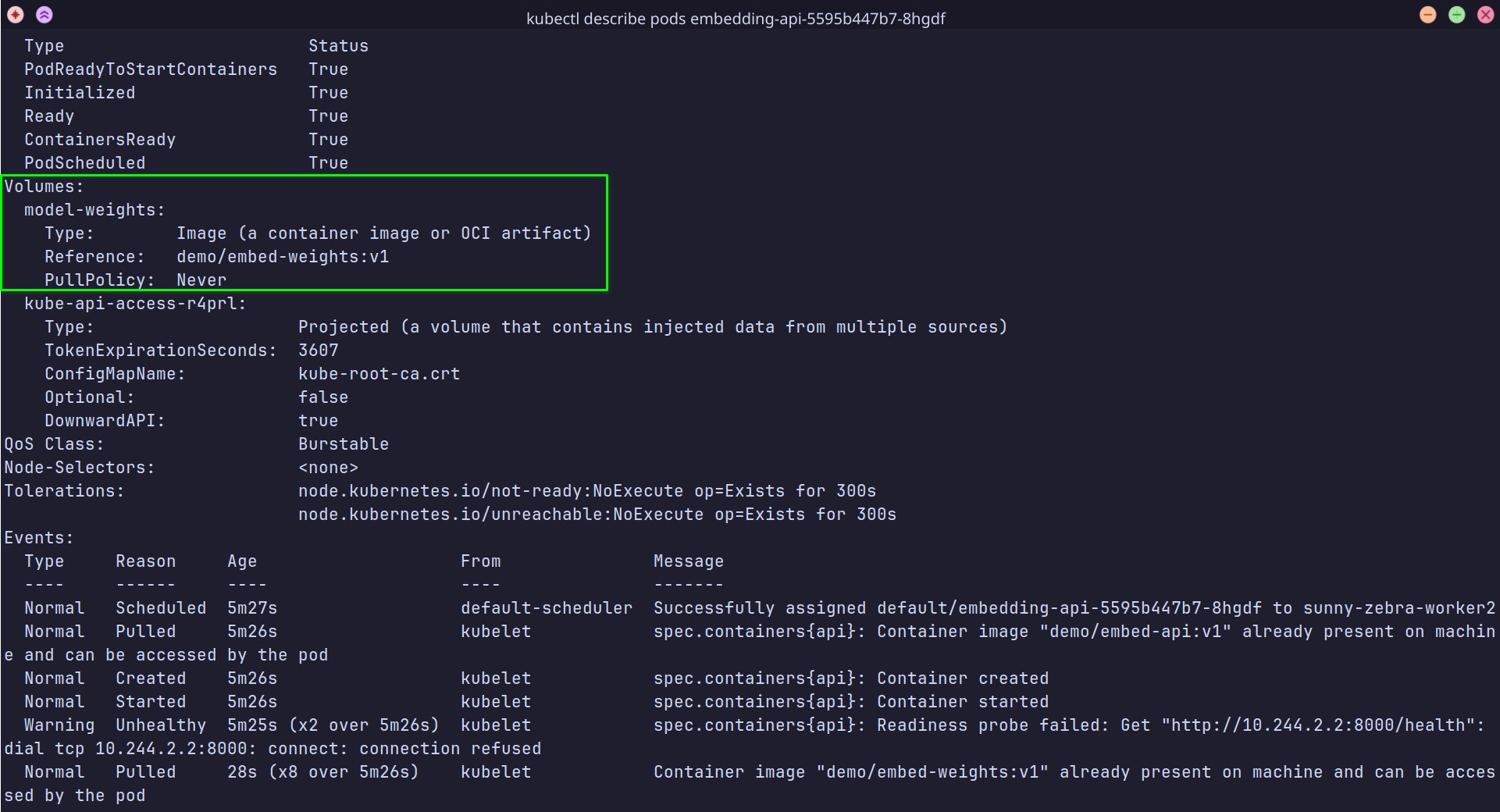
Kubernetes recognizes demo/embed-weights:v1 as an image volume with pullPolicy set to Never.
I also checked that the model files were available inside the container:
kubectl exec deployment/embedding-api -- ls -lh /models
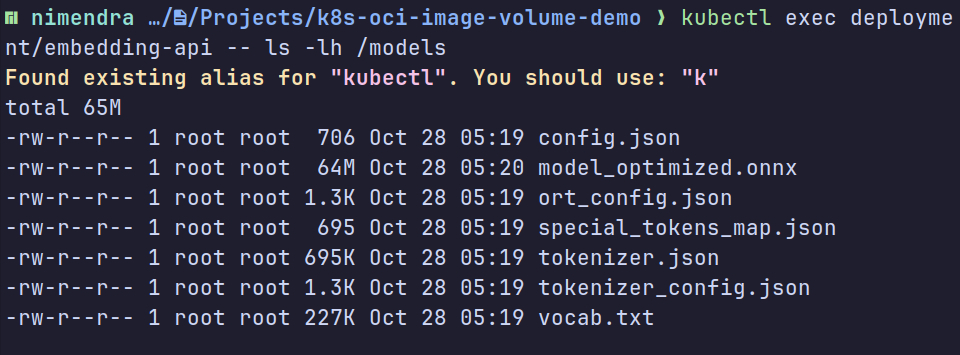
The ONNX model and tokenizer files are available at /models inside the embedding API container.
The model files are mounted and ready to use.
3. Test the Embedding API
Next, I forwarded the API port:
kubectl port-forward deployment/embedding-api 8000:8000
And sent a request:
curl -s http://localhost:8000/embed \
  -H "Content-Type: application/json" \
  -d '{"text":"Hello Kubernetes OCI Image Volumes"}' \
  | jq '{dimensions, first_8: .embedding[:8]}'
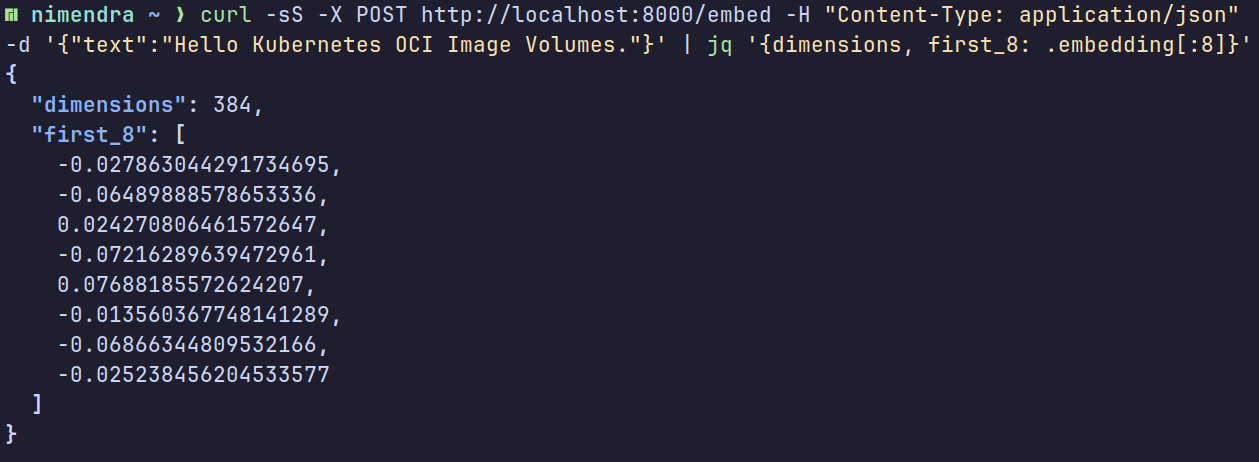
The embedding API returns a 384-dimensional vector using model files from the OCI image volume.
4. Reuse the Same Model Image Across Multiple Pods
One more interesting thing: multiple Pods can use the same model weights image.
kubectl scale deployment/embedding-api --replicas=3
kubectl get pods -o wide
All three Pods reference the same demo/embed-weights:v1 image.
When multiple Pods run on the same node, containerd can reuse the locally cached image layers. If they run on different nodes, each node needs its own copy.
This avoids rebuilding the model weights into each application image, although each inference server still loads its own model into memory.
Final Thoughts
OCI Image Volumes provide a simple way to package and distribute immutable data using infrastructure Kubernetes already understands.
For AI workloads, this means we can version, distribute, and update model weights independently of the inference server.
Although this article uses an AI workload as an example, OCI Image Volumes are not limited to mounting model weights. The user stories in KEP-4639 describe other use cases:
- Shared configuration: Package configuration files in an OCI image and mount them into multiple containers in a Pod without including them in each application image.
- CI/CD artifacts: Distribute binary artifacts separately and mount them into Pods while maintaining a small set of base images.
- Malware signatures: Mount private signature files into a public malware-scanner image without building a combined image.
The broader idea is to separate the software that runs from the immutable files it consumes.